Smart USD Conversions
Last updated: April 7, 2026
What is Smart USD Conversion?
When you send a USD payment to an international recipient, it sometimes gets converted to the recipient's local currency by an intermediary bank before it arrives. This conversion happens outside of your control and can result in unfavorable exchange rates and additional fees.
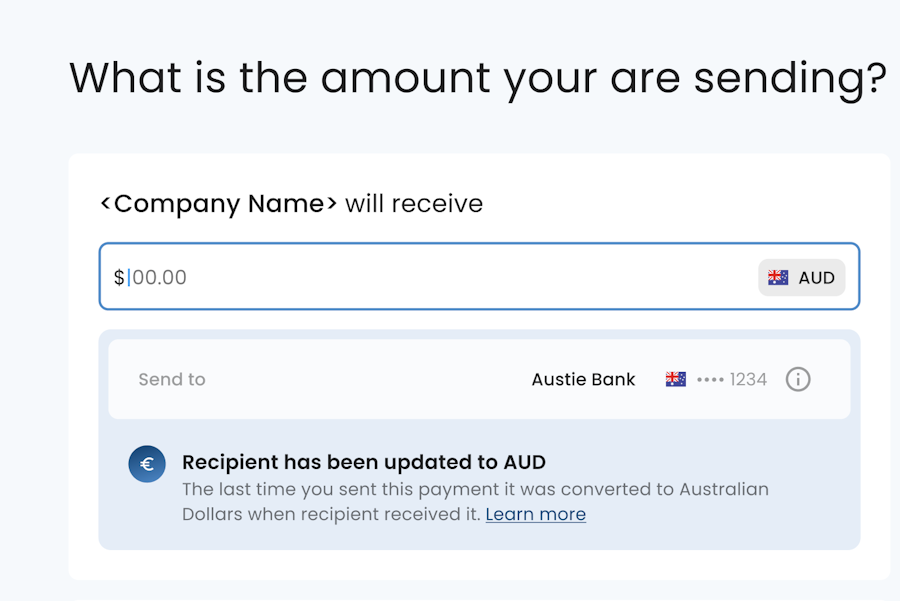
Smart USD Conversion detects when this has happened and automatically updates your recipient's preferred currency to match what was actually delivered. The next time you initiate a payment to that recipient, you'll see the updated currency reflected along with a notification explaining the change.
Why was my recipient's currency changed?
Your previous payment was sent in USD but was converted to another currency before reaching the recipient's bank. Rather than letting this happen again on future payments, the system updates the recipient so your next payment is sent directly in the correct currency.
How does this benefit me?
Sending in the recipient's local currency means the payment is delivered directly without intermediary conversions. This typically results in faster delivery, more predictable exchange rates applied at the time you send (not by a third party along the way), and fewer deductions or fees applied in transit.
Can I change it back to USD?
Yes. You can edit the recipient and set the currency back to USD. Be aware that if you do, intermediary banks will likely continue converting the payment before delivery, which means less visibility into the final amount received and potential additional costs.
To request a permanent change, contact your bank's support team.