How to Reset Password for Business
Last updated: March 20, 2026
How to reset your password
How do you usually access PayRecs?
Bank Customers
Users that utilize Single Sign On (SSO) into PayRecs cannot reset their password from PayRecs.
Please refer to your online banking platform's documentation in order to reset your password, or reach out to your Bank for further assistance.
Through payrecsapp.com
All users who log in directly through payrecsapp.com can use the "forgot password" link to reset their password. Or, an admin can reset your password for you.
Business
Login directly to payrecsapp.com
Navigate to the "People" menu (this requires manage users permission)
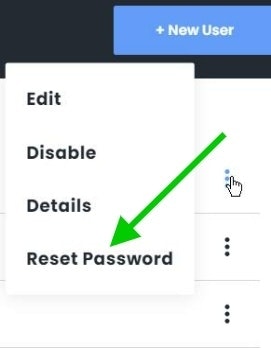
Select the 3 dots to the right of the desired user
Select "Reset Password"
This will send them an email with a link in which they can reset their password.
Recipient
How to reset a password for a recipient:
Login to PayRecs
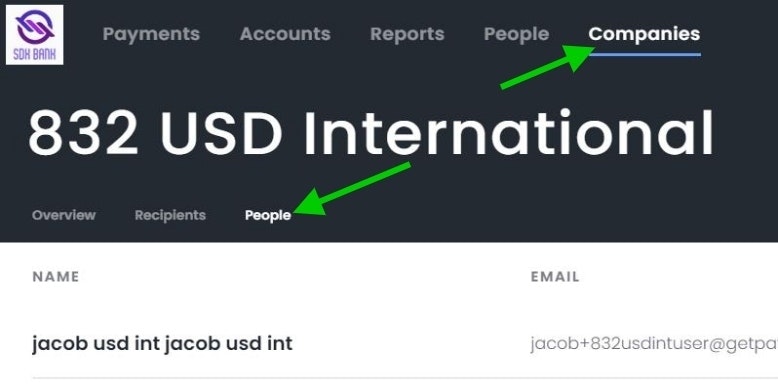
Navigate to the "Companies" menu
Select the desired Recipient/Company
Navigate to the "People" submenu
Select the 3 dots to the right of the desired user
Select "Reset Password"
This will send them an email with a link in which they can reset their password.
Enforced Password Reset Policy
This policy will require users to reset their password after 90 days in order to keep their passwords fresh and increase security.
90 days is the default value, but this can be changed by a request from the Bank.
Users will be prompted with a reminder, at each login, starting 15 days prior to their forced reset.