Remove a Customer From PayRecs
Last updated: March 18, 2026
If a customer is no longer going to be using PayRecs, there are two options to remove access.
In Q2 Central, disable the PayRecs entitlement for the specified customer. This will trickle down to any user entitlements as well and prevent any access to PayRecs for that customer.
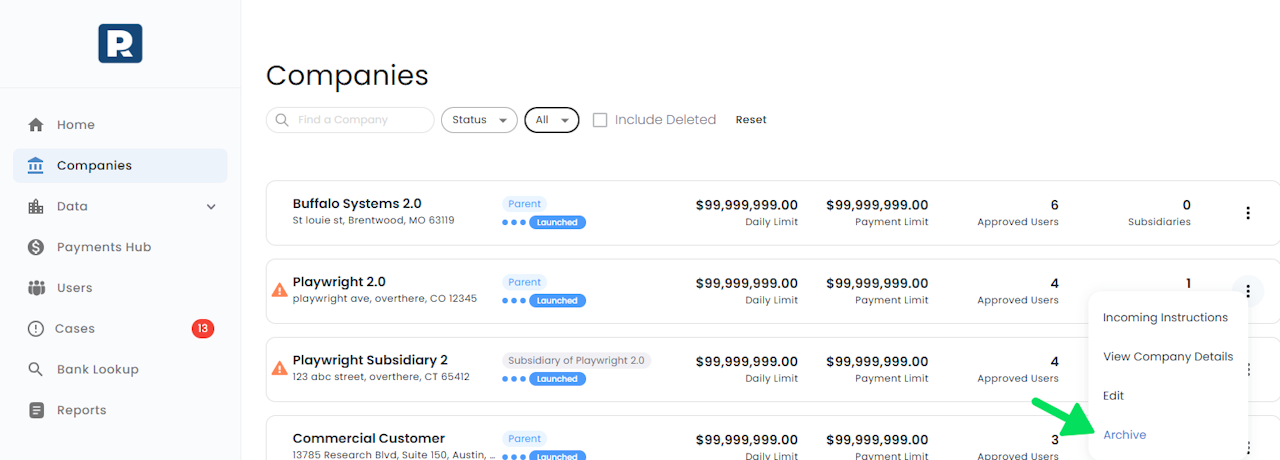
The orange warning icon(see screenshot) will indicate that the customer no longer has access to PayRecs.
To prevent access AND remove the Company from the PayRecs portal. Select the 3 dots next to the desired company and mark it as "Archive". This will soft delete the company and remove it from the companies list AND prevent SSO access.
To restore the company. Check the "Include Deleted" checkbox in the companies list, select the 3 dots next to the deleted company, and select the 'un-archive' option.
Please note: Historical data is retained relating to the customer as we are simply hiding the customer from view.