Cases
Last updated: March 18, 2026
Cases
Cases is a feature within the PayRecs application that allows our Support Team to request additional payment details directly from the paying party.
This optional feature helps reduce the workload of your Financial Institution’s (FI) operations or wire team by streamlining communication with customers.
Note: Cases are enabled at the Bank level and cannot be turned on for individual companies.
When a Case is Opened
A Case is typically opened when additional payment information is required. These requests may come from our payment processor, intermediary banks, or the beneficiary’s bank.
Here are common scenarios:
1. Compliance Inquiry
Requests related to regulatory or compliance requirements.
Examples include:
Relationship between the account holder and another entity
Date of birth of the account holder
Clarification of an abbreviated term
Description of the payment’s purpose
2. Post-Transaction Review
Even after a payment has been delivered, additional details may be required.
While this doesn’t affect the current transaction, missing information could cause delays or rejections for future payments.
Warning:
Be mindful of any due dates to avoid disruptions to future payments.
3. Wire Details Confirmation
These cases allow the sender to confirm or update wire details while a payment is in transit.
Requests may come from either our processor or the recipient bank.
Warning:
If you provide updated wire information, please also update the Recipient record in PayRecs to prevent similar inquiries in the future.
Process/Workflow:
PayRecs Support initiates a Case for a specific payment.
The payment initiator and approver receive an email requesting the needed information.
Customers can respond by:Selecting the link in the email to go directly to the Case, or
Logging in to PayRecs → navigating to the payment → selecting Cases
Example navigation screenshot
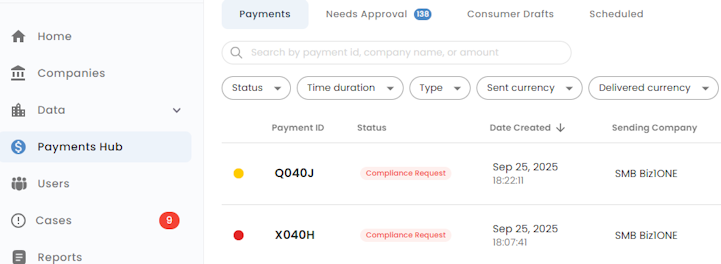
Cases can also be accessed from the Payments Hub by opening the related payment.
The Customer or FI back-office user (with proper permissions) can:
Enter a response
Attach supporting documentation
Submit the response
PayRecs Support reviews the submission.
If more information is required, a new Case will be opened for the same payment.
Once resolved:
Customers receive a resolution notification by email
The payment is cleared of any pending Case
FI back-office users with “resolved case” notifications enabled will receive an email update
Case Statuses
Status | Description |
In Review | Awaiting action from the PayRecs Operations team |
Waiting on Customer | PayRecs has requested information and is waiting for a response |
Resolved | All required information has been provided and the Case is closed |
Status Indicators:
Indicator | Meaning |
🟥 Red | Payment is on hold due to an unresolved Case |
🟨 Yellow | Payment has an open/unresolved Case |
Response Visibility
Type | Visible To |
Internal | FI operations team and PayRecs back office only |
External | All parties, including the customer |
Staying Informed
If you’d like to receive updates about your customers’ open Cases:
Provide PayRecs Support with the email addresses that should receive notifications.
FI operations teams with access to the PayRecs Partner Portal can also:
Monitor all open Cases
Receive creation/resolution notifications
Enable daily digest reminders
Comment directly on Cases
The daily digest can be customized to alert your team if a Case remains unresolved for a specific number of days.
To adjust user permissions, follow this guide: How to Change Admin Permissions
Notifications
See the case hub notifications for each user here